
Auto-Rename Scanner (Sequential)
Oleh rahmadi tegar
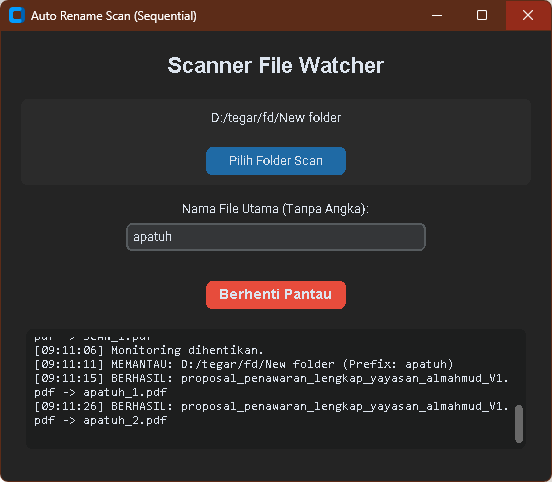
A modern Python-based GUI application designed to monitor scan destination folders in real-time and automatically rename files using a clean, sequential numbering system. "Automated file renamer with modern UI. Monitors directories for new scans and renames them to custom patterns (e.g., Prefix_1, Prefix_2) instantly using Python Watchdog."
📂 Auto-Rename Scanner (Sequential)
A modern Python-based GUI application designed to monitor scan destination folders in real-time and automatically rename files using a clean, sequential numbering system. "Automated file renamer with modern UI. Monitors directories for new scans and renames them to custom patterns (e.g., Prefix_1, Prefix_2) instantly using Python Watchdog."
✨ Key Features
Real-time Monitoring: Instantly detects new files in the target folder using the watchdog library.
Sequential Naming: Replaces complex timestamps with simple numbers (e.g., DOC_1.pdf, DOC_2.pdf).
Modern UI: Dark-themed interface built with CustomTkinter.
Safety Delay: Includes a 1.5-second buffer to ensure files are fully written by the scanner before renaming.
Multi-format Support: Works with .pdf, .jpg, .jpeg, and .png files.
🛠️ Requirements
To run from source, you need:
Python 3.x
Libraries: customtkinter, watchdog
pip install customtkinter watchdog
## 🚀 How to Use
1. Run `main.py`: Open the script in VS Code and press F5, or run `python main.py` in the terminal.
2. Select Folder: Click the "Select Folder" button and choose the directory where your scanner saves files.
3. Set Prefix: Enter your desired file prefix (e.g., `INVOICE` or `DOC`).
4. Start: Click the Start Monitoring button. The app will now watch for new files and rename them instantly.
## 📦 Download Executable (.exe)
For Windows users who prefer not to install Python, you can download the standalone application from the Releases page.